Using ODBC for Lotus Domino 32-bit on Windows Server 64-bit

A friendly reminder: if you are running Lotus Domino 32-bit on a Windows Server x64 (64-bit) and need to use ODBC, then you need to define your ODBC data sources in the 32-bit ODBC Administrator program – and not in the standard 64-bit ODBC Administrator program. This is because the Lotus Domino ODBC drivers are 32-bit.

The 32-bit ODBC Administrator program is located at C:\Windows\SysWOW64\ODBCAD32.exe.

Excel automation on Windows Server 2008 x64: solution to SaveAs method problem

A customer of mine uses Lotusscript and the Microsoft Excel object to create Excel spreadsheets with scheduled agents. The code is based on the normal way of creating spreadsheets – e.g.:

Set ExcelApp = CreateObject("Excel.Application")
Set ExcelWorkbook = ExcelApp.Workbooks.Open("C:test.xls")
Set ExcelWorksheet = ExcelWorkbook.Application.Workbooks(1).Worksheets(1)

The scheduled agents worked fine on a Windows Server 2003. The application was then installed on a freshly installed Domino server running on a freshly installed Windows Server 2008 x64 (64 bit) and then the scheduled agents started failing with the following error message: “SaveAs method of Workbook class failed“.

After several tries of fixing the code I finally found the simple (but unexpected) solution to the problem: create a folder called “Desktop” in C:\Windows\SysWOW64\config\systemprofile\.

Yes, that’s it! just create the folder and then the code starts working again 🙂

Client project: XPages CMS and web shop with card payment

A project for one of my clients went live last week. It’s a portal on heart failures and defibilator products with a related web shop where you can buy automated external defibrillators (AEDs) and accessories. The portal is in Danish.

My company PHL Consult was responsible for the implementation of the portal while Supermouse design studio was responsible for the design.

The portal is built entirely on Lotus Domino XPages and features a content management system (CMS) and a web shop.

The CMS is controlled from the Lotus Notes client.

The web shop is integrated with the client’s existing backend product catalog, CRM and ordering system which runs as standard Lotus Notes client only applications on an internal Lotus Domino server. Furthermore, the web shop is integrated with a payment card gateway from the Danish provider DIBS. The use of a payment card gateway effectively shields off the PCI requirements on e.g. encryption of card numbers from the shop and the client.

I am now an IBM Certified Application Developer – Lotus Notes and Domino 8.0

I passed the IBM Lotus Notes Domino 8 Application Development Update exam (LOT-801) today and have thereby upgraded my certification to IBM Certified Application Developer – Lotus Notes and Domino 8.

I primarily used the Lotus Notes/Domino 8.0 release notes and the Notes/Domino Designer 8.0 Help and also the LOT-801 practice test from CertFX. The 801 test has a lot of focus on Domino on DB2, Composite Applications, and Web Services. I can – once again – highly recommend using a practice test as it gives you a good indication of how the actual test will be structured. Good luck if you consider taking a certification test.

I can now look forward to the LOT-951 test to achive the 8.5 certification – and then later the necessary test to achieve the Advanced 8.5 certification.

XPages custom 404 and error page

This post is about creating a custom error page for handling errors (both controlled errors and not controlled errors) in XPages.

For handling errors in non-XPages requests a non-XPages 404/error page has to be added. To create a custom non-XPages error page, see the Help topic “Custom Web server messages” in Domino Administrator or have a look at this great article by Julian Robichaux on Lotus Domino custom web error pages.

First step for handling errors in XPages requests is to create the  XPage to be used. This XPage can be styled as you wish and you will probably reuse your overall site design – for instance by reusing custom controls that controls the look and feel of your web pages.

To catch controlled errors such as “page not found” errors (to “simulate” a HTTP 404 response) you can use a try/catch statement to redirect to the new XPage in case of “page not found” related errors on your XPage. This can be used to catch errors with data sources where the document id can not be found. The following example code from the documentId part of dominoDocument data source redirects to a custom XPage in case an article id can not be found:

try {
	var tempView:NotesView = database.getView("webpages-by-id");
	var tempDoc:NotesDocument = tempView.getDocumentByKey(param.id);
	return tempDoc.getUniversalID();
} catch(e) {
	context.redirectToPage("error.xsp")
}

The new XPage can also be used instead of the default error page to catch not controlled errors (errors/exceptions in your code). See this article on XPages error management in the Lotus dev wiki. In short, you need to add a computed field that display the value of the request scope variable “error”. The following example code displays the error message in a panel that is only displayed f the scoped variable “error” is present:

<xp:panel id="displayErrors">
	<xp:this.rendered>
		<![CDATA[#{javascript:if (requestScope.containsKey("error")) {
		return true;
		} else {
		return false;
		}}]]>
	</xp:this.rendered>
	<p>
		<b>Description of error:</b>
		<xp:br></xp:br>
		<xp:text escape="true" id="displayError" value="#{requestScope.error}"></xp:text>
	</p>
</xp:panel>

If you want to provide more detailed error messages on this error page, you can add the following computed field:

<xp:text escape="true" id="computedField">
	<xp:this.value>
		<![CDATA[#{javascript:var stackTrace ="";
		var trace = requestScope.error.getStackTrace() ;
		for( var i = 0; i < trace.length; i++){
		stackTrace += trace[i] + '\n';
		}
		return stackTrace;
		}]]>
	</xp:this.value>
</xp:text>

Please consider whether these detailed error messages are something that you would like to present to the users.

A better approach to displaying detailed error messages to your users would be to use logging in your application and then log the detailed error messages and instead present a user friendly error page. Matt White has integrated the OpenLog OpenNTF project with XPages in the TaskJam OpenNTF project. I will definitely have a look at this in the very near future.

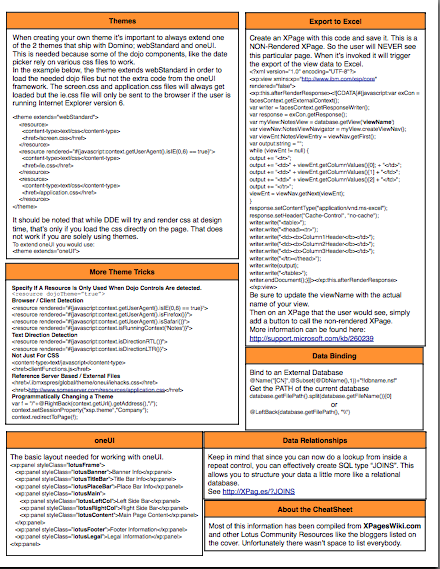
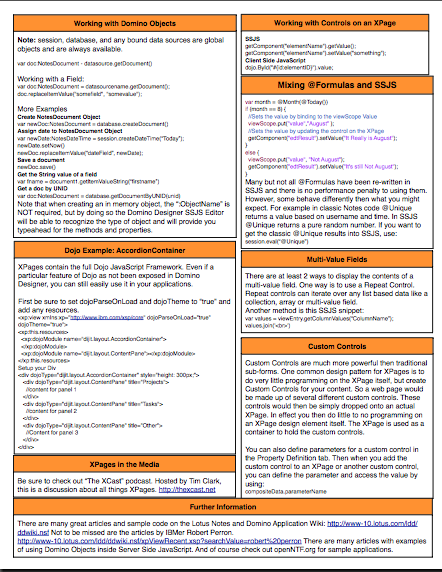
XPages cheat sheet

David Leedy has just announced that his XPages cheat sheet will be available for handout at Lotusphere 2011. I can confirm that it is a useful cheat sheet because David involved me in a 2 hour review of the cheat sheet. It was great fun and I am pleased to have been involved in putting the cheat sheet together.

Now I just need someone from the Lotus community to grab me a copy of the handout at Lotusphere that can replace my self-printed copy. Anyone? 🙂

Below is a sneak peek at the cheat sheet courtesy of David Leedy. You will have to wait for Lotusphere 2011 for the real thing:

Update January 21: David has released the XPages cheat sheet a little earlier. Go grab your copy!

Presentation: My view on XPages

I was asked by one of my customers to present my view on XPages and my experience with XPages to their development team. The development team had no experience with XPages but instead with classic Lotus Domino development. I gave the presentation on January 6 and the majority of the presentation consisted of live demos of XPages functionality to show the team how easy it is to use modern web technologies such as Ajax for a Lotus Domino web application.

The presentation is available on Slideshare:

The presentation makes most sense when seen live together with the live demos. Maybe a topic for a video podcast someday? 🙂

Update: Erik Brooks pointed out in the comments that with 8.5.2 it is now possible to call Lotusscript agents from XPages – thereby making reuse of existing backend Lotusscript code possible. The App Dev wiki has more information on the use of Agent.runWithDocumentContext(). I have updated my presentatio on Slideshare to reflect this. Thanks Erik.